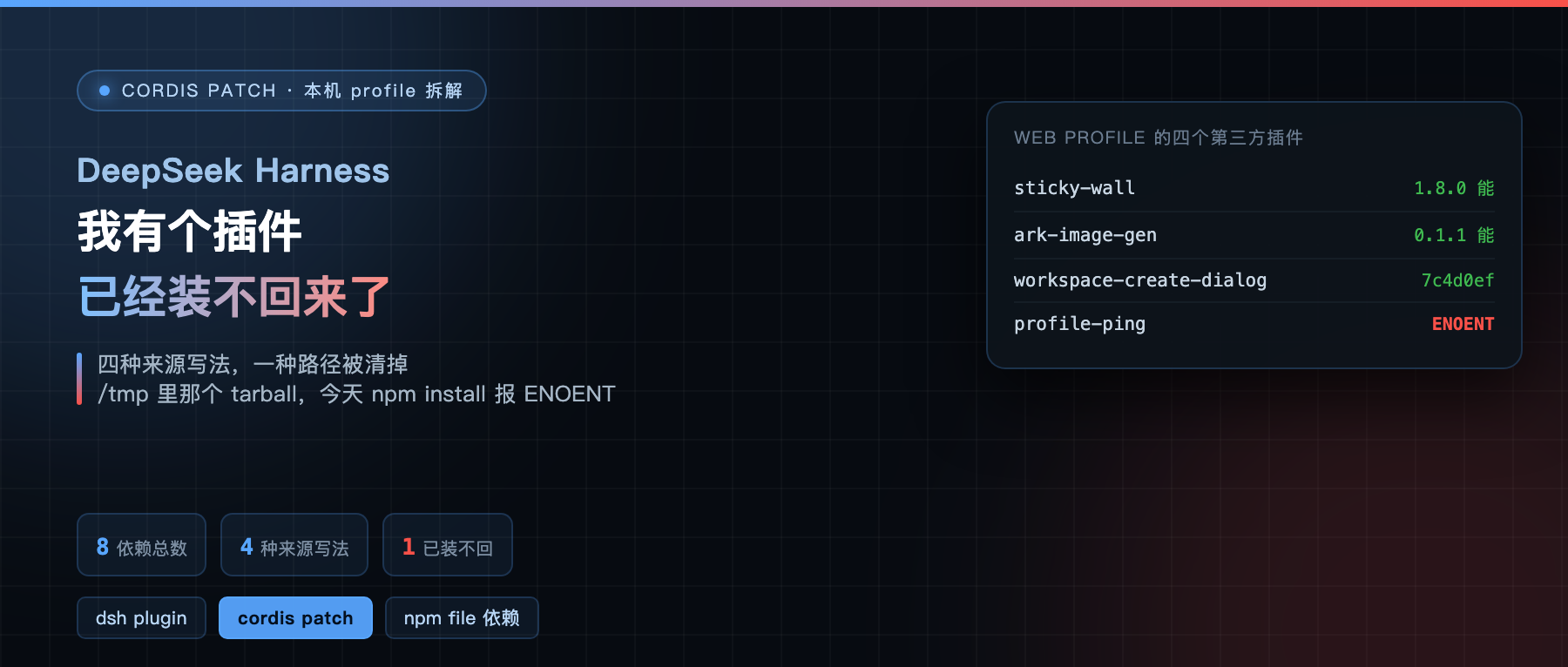
I ran dsh plugin --profile web list and it printed one number: 8 packages. Eight dependencies, four of them third-party plugins I installed myself, the other four are the official bundles. It looked tidy, until I went to check how their versions were declared.
Four notations, four sets of logic. And one of them, as of today, I can no longer reinstall.
The four lines I saw first
In the profile’s package.json, these four plugins declare their dependencies in four different forms: one plain version number, another plain version number, one GitHub URL pinned to a forty-character sha, and one local tarball pointing under /tmp.
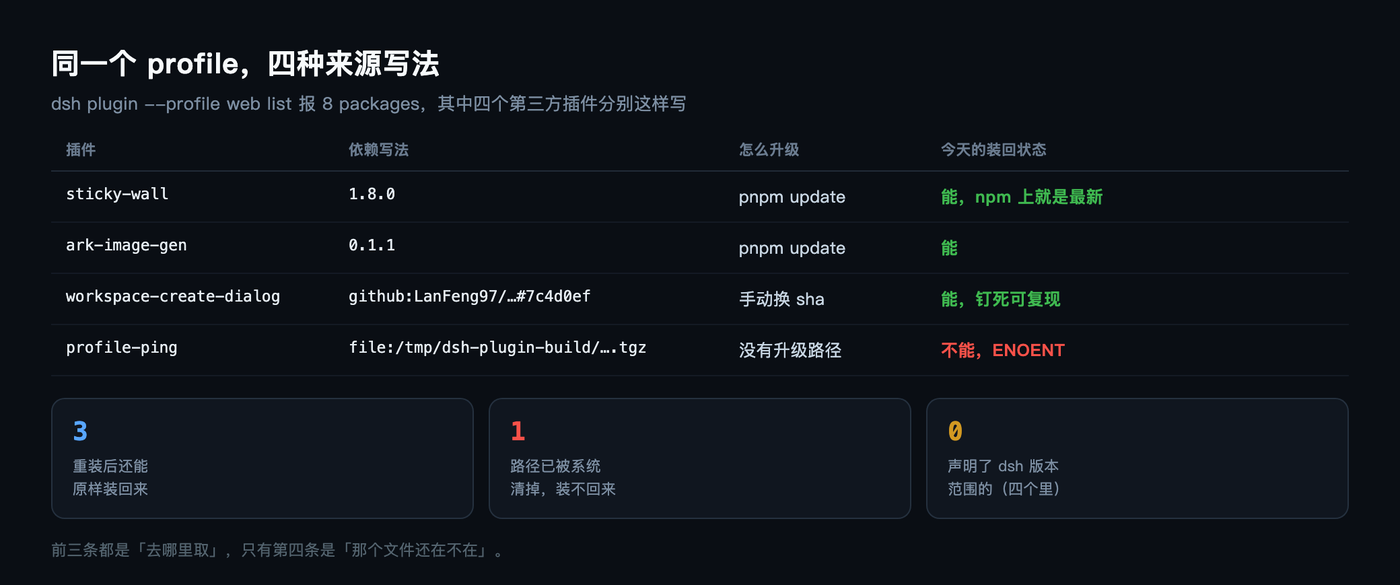
Line one is the version 1.8.0, line two is also a version, 0.1.1, line three is github:LanFeng97/dsh-workspace-create-dialog#7c4d0ef..., and line four is file:/tmp/dsh-plugin-build/dsh-plugin-profile-ping-0.1.0.tgz.
The official docs call all of these “installing a plugin”: whatever you put after dsh plugin add gets installed. At install time there is no difference. After install, the difference shows up entirely in upgrading and reinstalling.
A version number is the least trouble
dsh-plugin-sticky-wall and dsh-plugin-ark-image-gen use ordinary npm dependencies with a version number. The first is 1.8.0, the second is 0.1.1.
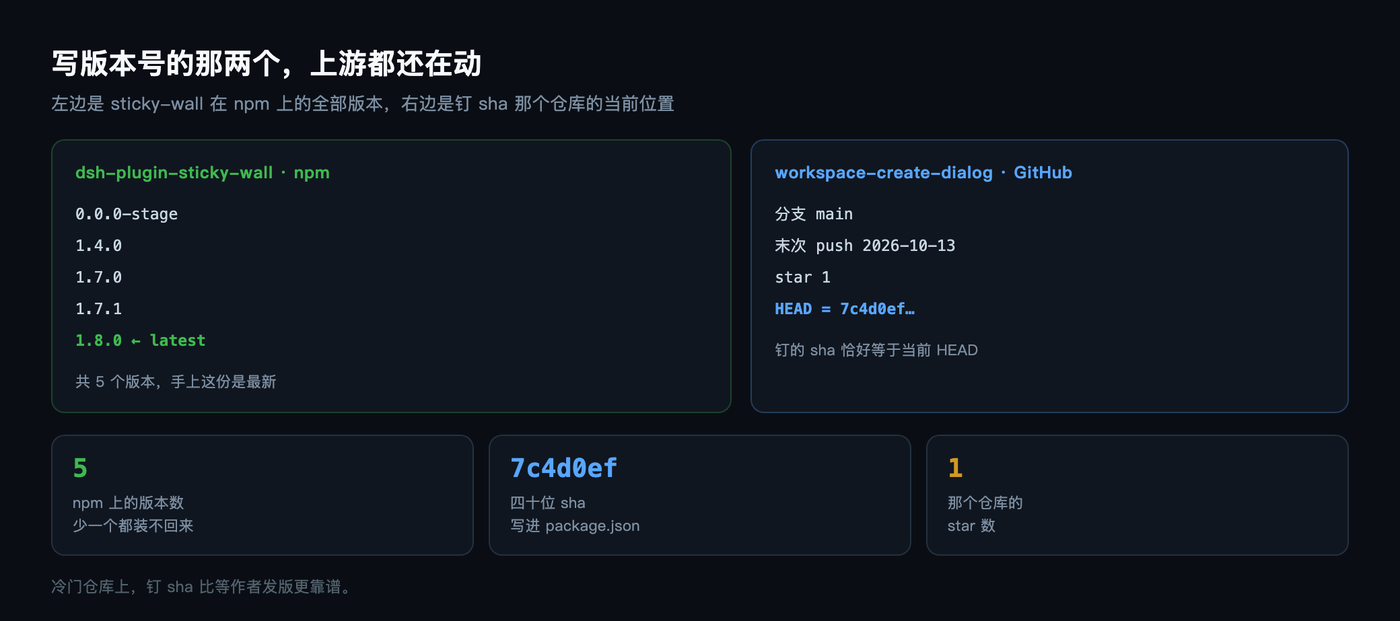
The advantage of this form is that it can be checked: according to the output of npm view dsh-plugin-sticky-wall versions, five versions are listed, 0.0.0-stage, 1.4.0, 1.7.0, 1.7.1, 1.8.0, and latest is exactly 1.8.0. So what I have is the newest one, nothing behind.
The cost is that the moment the author changes something, you follow. latest moves one step forward, and the next pnpm update or profile reinstall hands you the new version, with no intermediate rung to pick.
The sha-pinned one freezes very cleanly
dsh-workspace-create-dialog was installed straight from GitHub, with a forty-character sha hanging off the end.
This notation locks the version to that one commit. Whatever the author changed afterward, how many times they refactored, which dependencies they added, none of it concerns you: every reinstall gives you exactly the same thing. To upgrade, you go find the new sha yourself, edit package.json, and install again.
I went ahead and checked whether this sha is the current latest. The default branch of the repo LanFeng97/dsh-workspace-create-dialog is main, and the last push was on 2026-10-13.
The first item returned by commits?per_page=1 happens to be 7c4d0ef91a0ad9d49efa71ec5a637a53e6d87b2f. So the version I pinned is, at this moment, HEAD.
This repo currently has 1 star. Pinning a sha is actually the most reliable choice on an obscure repo, because it does not depend on the author tagging a release, does not go through npm publishing, and does not care if the repo gets renamed. The only cost is that you have to remember to come back and verify once.
The local tarball line broke today
dsh-plugin-profile-ping says file:/tmp/dsh-plugin-build/dsh-plugin-profile-ping-0.1.0.tgz.
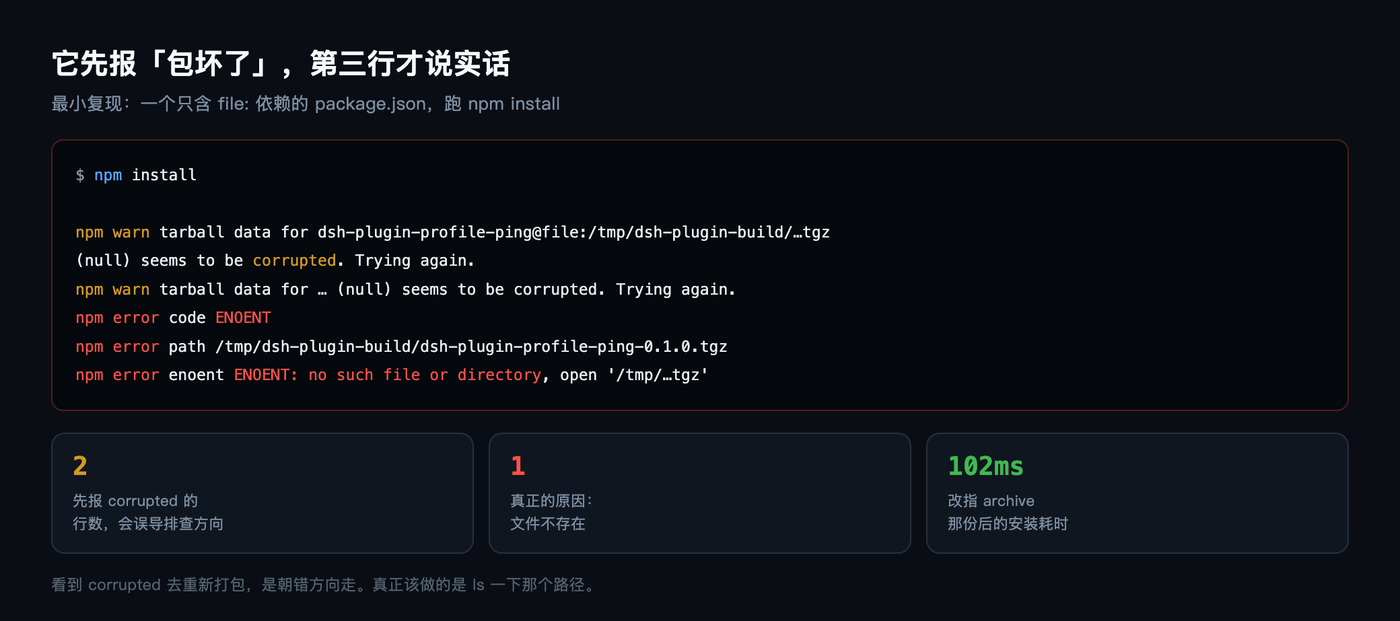
That is something I packaged and dropped in myself. I made a minimal package.json with just this one dependency, ran npm install, and got this:
npm warn tarball data for dsh-plugin-profile-ping@file:/tmp/dsh-plugin-build/…tgz (null) seems to be corrupted. Trying again. npm error code ENOENT npm error path /tmp/dsh-plugin-build/dsh-plugin-profile-ping-0.1.0.tgz npm error enoent ENOENT: no such file or directory
The directory /tmp/dsh-plugin-build is gone. macOS clears /tmp on a schedule, and it does not ask your permission.
The most misleading part is that it reports two lines of corrupted first and only admits ENOENT on the third. On seeing corrupted, the first instinct is that the package format is broken and you should repackage it. The actual reason is far simpler: the file itself is gone.
And the matching entry in pnpm-lock.yaml dies along with it: version: file:../../../../../tmp/dsh-plugin-build/dsh-plugin-profile-ping-0.1.0.tgz. Five .. segments climb back to the root and then descend into /tmp.
Which means this profile of mine will now get stuck on that one package the next time it is reinstalled. It is not that the whole profile is ruined, it is that the install does not complete.
It did leave a way out, just not pointed at it
Lying in ~/.dsh/plugin-archives/ is dsh-plugin-profile-ping-0.1.0.tgz, 4,162 bytes, dated November 4.
I changed the dependency path to point at that copy, ran the install again, and the result was added 1 package in 102ms.
Same package, same bytes, alive again after a path change. That tarball is dated 2026-11-04. So the only broken line out of my four has a one-line fix: replace /tmp/dsh-plugin-build/ with ~/.dsh/plugin-archives/.
I unpacked it for a look, seven entries in all. index.js at 6,954 bytes is the main body, README.md at 1,788 bytes, icon.svg at 647 bytes, package.json at 526 bytes, two json files under locale at 199 and 196 bytes, and cordis.patch.yml at only 71 bytes.
The seven entries total 10,381 bytes unpacked, compressed into a 4,162-byte tarball, a 59.9% reduction.
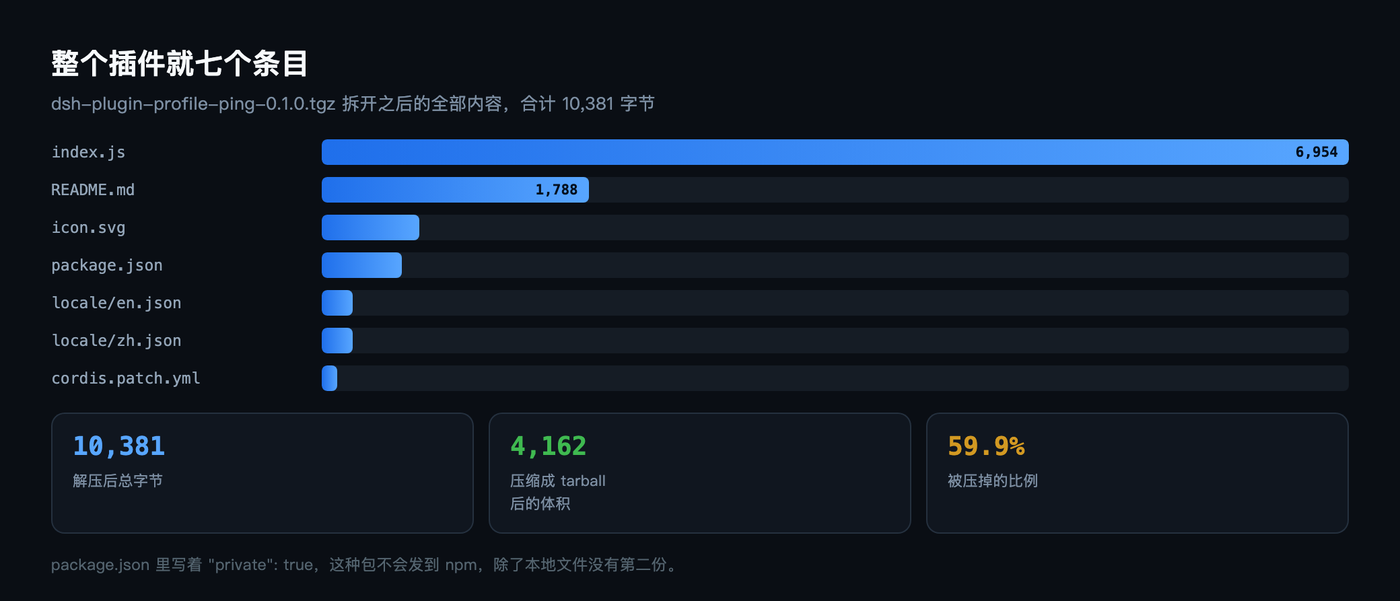
package.json contains a line "private": true. A package with this flag never goes out to npm, so my local copy has no public version to look up, and apart from the file on my own disk there is no backup anywhere.
The fourth is a link to a source directory
The superagent profile uses yet another notation: dsh-superagent: link:/Users/trevorwang/dsh-superagent.
link: is a symlink to a local source directory, not a copy. After editing the code you do not reinstall, the next launch picks up the new one. When developing a plugin this is the smoothest form, with essentially zero cost per try.
The cost is equally direct: no version number, no sha, no tarball. Move the directory or rename it, and the profile becomes a symlink pointing at nothing. Whether it can be reinstalled depends on whether that source directory still exists.
Every plugin carries its own patch strip
The four sources go into package.json in very different ways, but once installed they look identical, because they follow the same convention.
All four plugins have a line dsh.bundle.patch in package.json, pointing at the cordis.patch.yml in their own directory. That file holds an insertion declaration stating its own loader id and package name.
The comment in the dsh-workspace-create-dialog copy is the clearest. It reads: “bundle patch: inserts this plugin’s loader line into the web profile roster. Declared by dsh.bundle.patch in package.json, effective as the profile bundle layer at install time.”
The ones with a front end add one more layer. sticky-wall declares client.platform: "web", and workspace-create-dialog goes further, hanging three UI packages off client.inject: renderer, layout, and workspace. The remaining two are backend-only, with only bundle in the dsh field and no client.
So “source” only decides how the version resolves. Once installed, everyone takes the same road. That also means a local tarball plugin and a released npm plugin are treated exactly the same at runtime, and you cannot tell which one is the wild one.
Only one of the four declares a version range
This is the part I think deserves the most attention.
Besides bundle and client, the dsh field of dsh-workspace-create-dialog has an engines entry: >=0.2.0-rc.2 <0.3.0 || >=0.3.0-0. It tells you plainly which Harness versions this plugin can run on.
The other three declare none. The dsh field of sticky-wall has just two things, bundle and client.platform. ark-image-gen and profile-ping have only bundle.
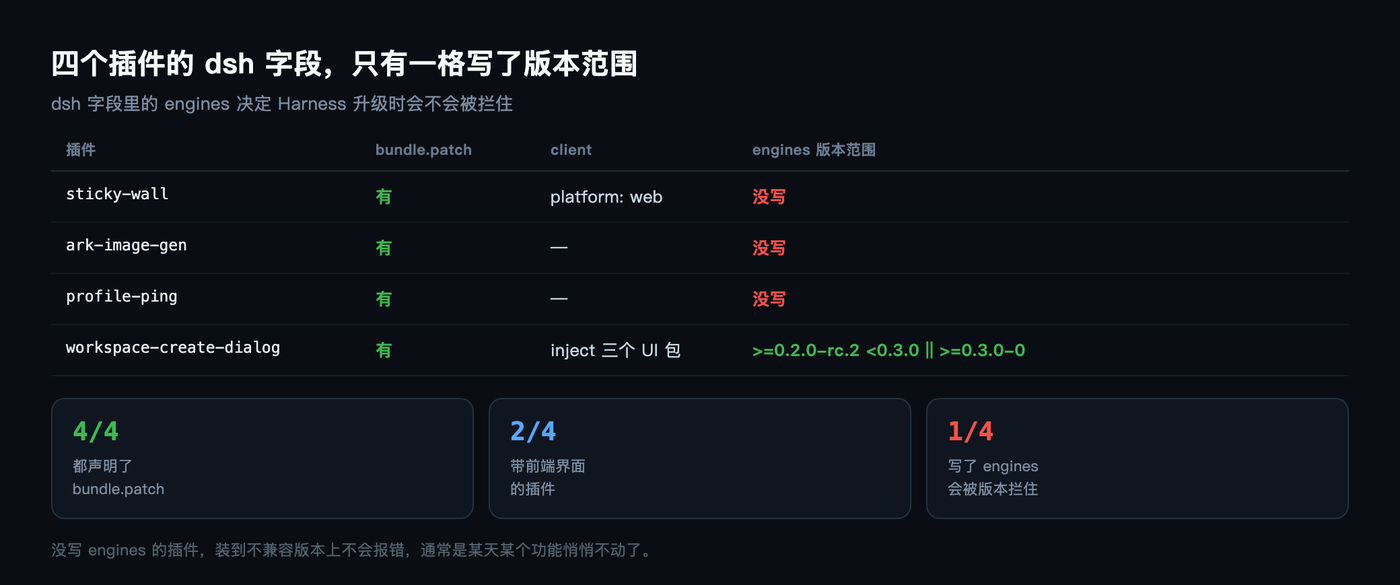
A plugin without engines is not blocked when installed on an incompatible version. It throws no error at install and no warning at startup. Usually some feature just quietly stops working once it runs, and you have to trace it back yourself.
That also explains one thing: after a Harness upgrade, the plugins that break are often the unassuming little ones. Declaring a range at least blocks you at install time. Declaring nothing leaves it to your memory that the plugin exists.
Installable does not mean reinstallable
These days, when I look at a plugin, I check how its dependency line is written first.
A version number is the least trouble, but also the easiest to be pushed along by the author. A pinned sha is the most stable, at the cost of watching upstream yourself. A local tarball is the most free, but as long as that path is not under your control, it can turn into what I hit this morning at any moment. A link to source is the most convenient for development, with no concept of a version at all.
All four install the same way, and during the install you feel no difference. What really decides how long it lives is where that path is, who can delete it, and whether anyone kept a copy for you before it expires.
One more judgment from this half day: the dsh plugin command itself does almost nothing. The help text says it plainly, it just forwards the remaining arguments verbatim to pnpm, executed inside the profile directory.
So plugin source rules are npm source rules. A file: pointing at a nonexistent file gives ENOENT, and dsh has nothing to do with it. Once you know that layer, every problem that seems to happen to Harness can be investigated with plain npm common sense.
By the way, if some file: dependency of yours is sitting in /tmp too, go ls it right now. If it really is gone, ~/.dsh/plugin-archives/ may still hold a copy.
Of the plugins you have installed now, how many live on a local path? I plan to move all of mine into the archive. Do you think there is anywhere else worth cleaning up at the same time?