I didn’t believe this either, so I built three projects.
Same screen, one centered line of Hello World: one pure SwiftUI, one Kotlin Multiplatform with UIKit controls wired by hand, one Kotlin Multiplatform with Compose. Same toolchain, Release, arm64, unsigned, weighed as IPAs.
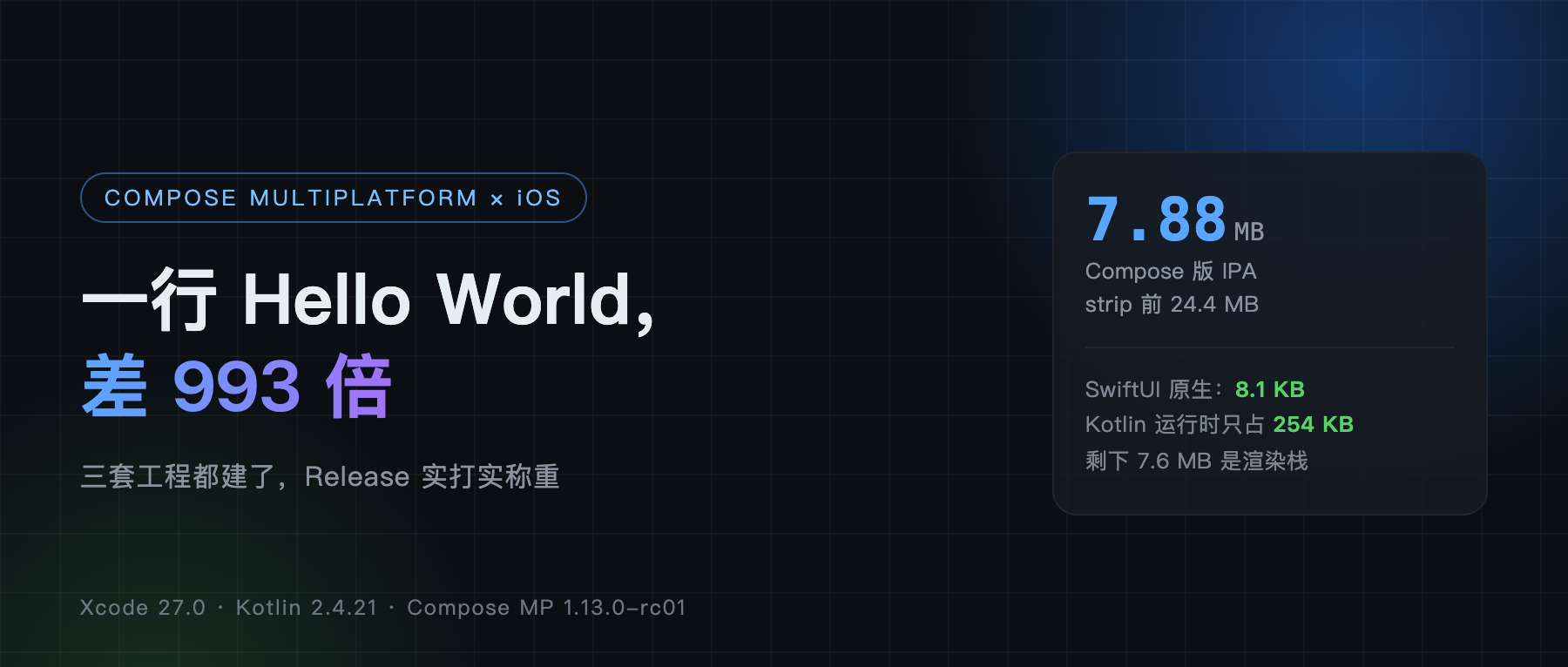
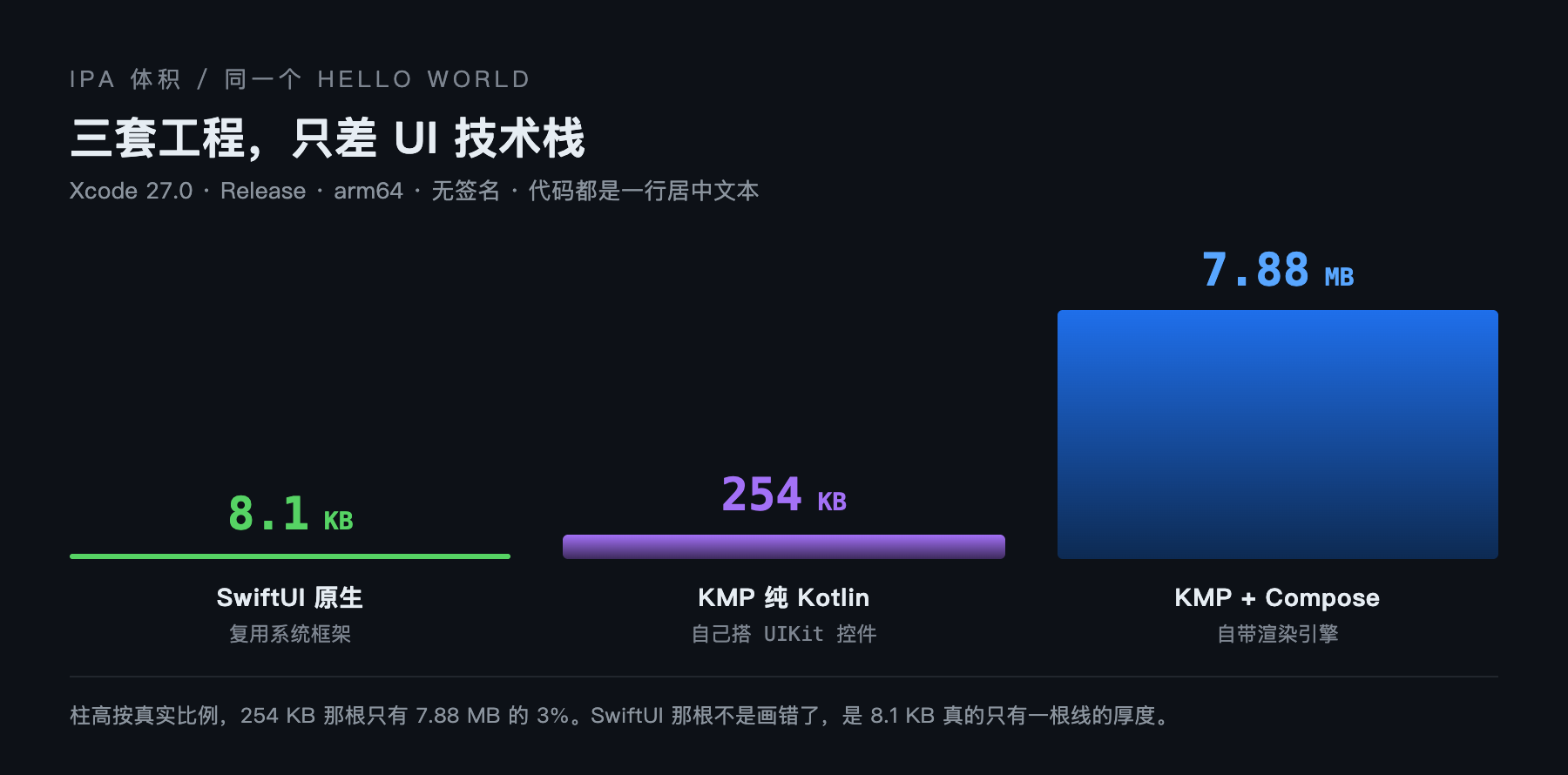
8.1 KB, 254 KB, 7.88 MB.
That’s a 993x spread from end to end. But the number that actually matters is the one in the middle — 254 KB cleanly separates what Kotlin costs from what Compose costs.
How they were built
Everything ran locally: Xcode 27.0 (Build 27A266a), iOS 27.0 SDK, Kotlin 2.4.21, Compose Multiplatform 1.13.0-rc01, JDK 21.
The Compose version is a shared module plus a thin iOS shell, with a single composable:
@Composable
fun HelloScreen() {
    MaterialTheme {
        Surface(modifier = Modifier.fillMaxSize()) {
            Box(Modifier.fillMaxSize(), contentAlignment = Alignment.Center) {
                Text("Hello World")
            }
        }
    }
}
The bridge is one function:
fun MainViewController(): UIViewController = ComposeUIViewController { HelloScreen() }
Dependencies are just compose.runtime, foundation, material3, ui. No navigation, no serialization, no networking.
The plain Kotlin version uses the same framework and the same bridge function, but skips Compose and drops a UILabel into the view:
fun MainViewController(): UIViewController = UIViewController().apply {
    val label = UILabel(frame = CGRectMake(0.0, 0.0, 320.0, 44.0))
    label.text = "Hello World"
    label.textAlignment = NSTextAlignmentCenter
    view.addSubview(label)
}
The native version is a single ContentView with one Text("Hello World").
I hand-wrote the project.pbxproj for all three Xcode projects instead of using the IDE wizard — that way the only variable is the UI stack.
Four measurements, three implementations
Bundle-size arguments are usually arguments about what was measured.
| Measurement | SwiftUI | Plain Kotlin | KMP + Compose |
|---|---|---|---|
| Executable | 77.2 KB | 960.9 KB | 24.41 MB |
After strip -x | 70.0 KB | 621.9 KB | 18.33 MB |
Whole .app | 88.0 KB | 972.0 KB | 24.42 MB |
| IPA (compressed) | 8.1 KB | 253.5 KB | 7.88 MB |
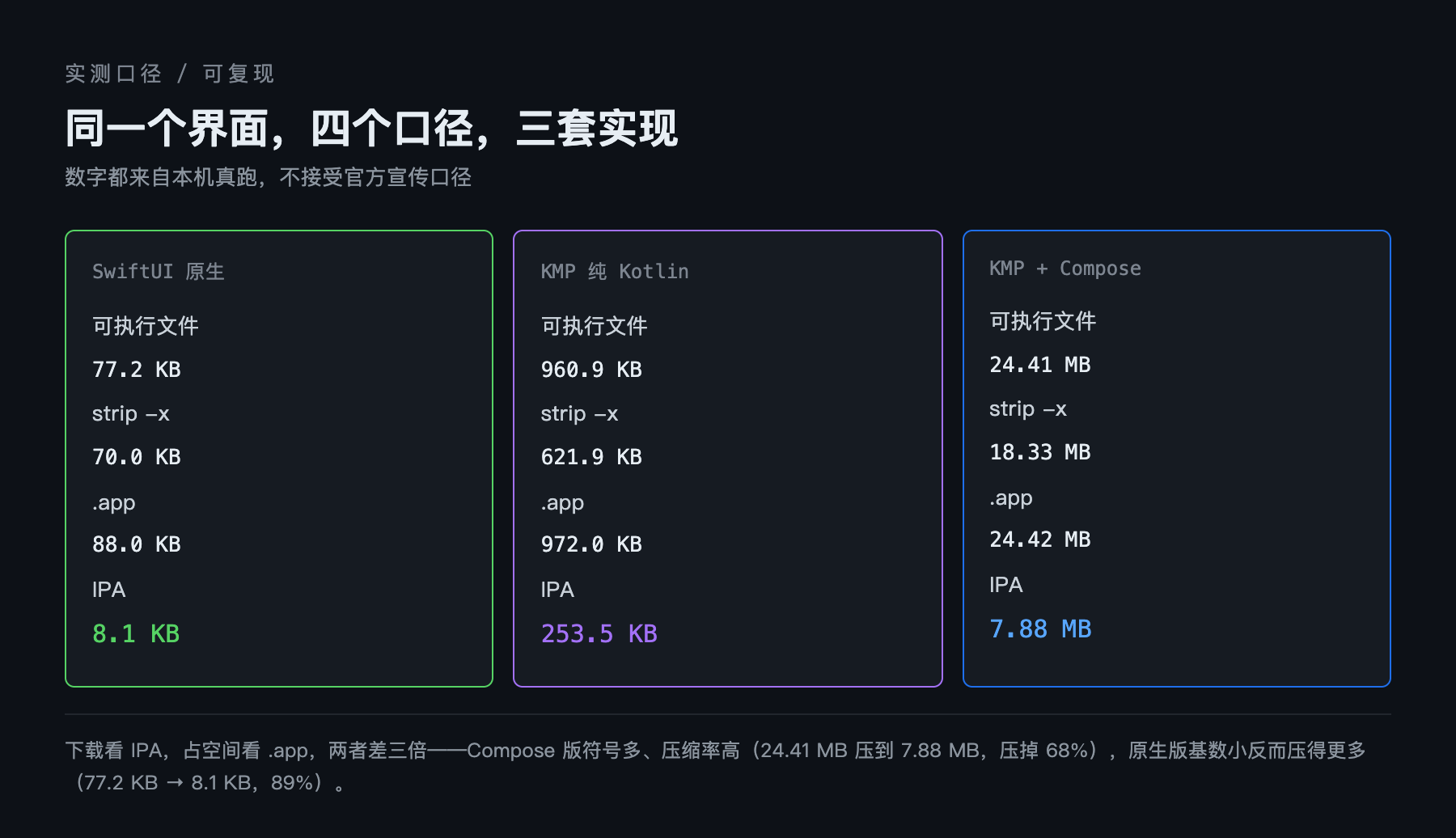
What a user downloads from the App Store is the IPA row. What it occupies on disk is the .app row.
Worth noting: for the Compose build those two differ by 3x. The executable is 24.41 MB, the IPA is 7.88 MB — 68% stripped away by compression, because it carries a lot of symbols and unpruned framework code. The native build has too small a base for that to matter: 77.2 KB down to 8.1 KB, 89% gone, same order of magnitude.
Splitting Kotlin from Compose
This is why I built the third project.
Swap only the UI implementation, hold everything else fixed, and Compose is 7.63 MB heavier than plain Kotlin as an IPA. Meaning the Kotlin/Native runtime itself costs 245 KB, and the remaining 7.6 MB is Compose.
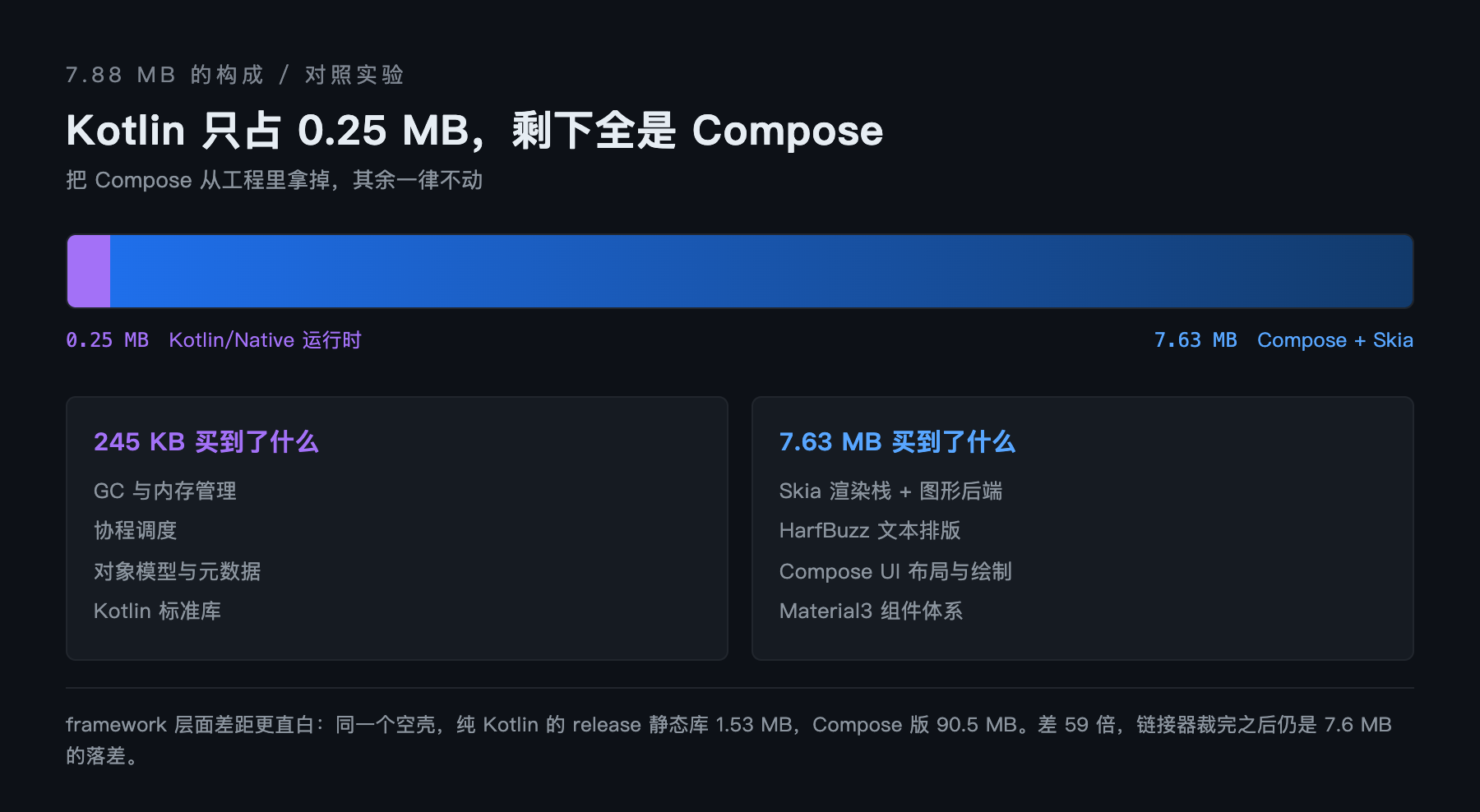
What 245 KB buys you: GC, coroutine scheduling, the object model, the standard library. For a cross-platform runtime, that’s cheap enough to ignore.
What 7.63 MB buys you is a different story.
The Skia render stack. Compose on iOS doesn’t draw through UIKit; it ships its own rendering engine. Graphics backends, HarfBuzz text layout, font handling, image decoding — in the native world those live in system frameworks, in Compose they live in your bundle.
Compose UI and Material3. Layout, the drawing pipeline, the whole Material component set. Even if you write a single Text, the component system is along for the ride.
At the framework level the gap is starker. Same empty shell: the plain Kotlin release static library is 1.53 MB, the Compose one is 90.5 MB — 59x. The linker prunes a lot when it builds the app, but it can’t prune Skia, so the final delta lands at 7.6 MB.
So “Compose is big” is imprecise. Kotlin takes almost nothing. Compose’s render stack is the cost.
Why native reaches 8 KB
Because it carries nothing.
Behind SwiftUI’s Text are UIKit, CoreText and CoreAnimation, which have shipped inside iOS since 1.0 and are not in your IPA. Your bundle holds a handful of classes and an Info.plist.
That’s also why this comparison looks so alarming: it pushes “ships its own engine” versus “reuses the system” to its absolute limit.
How to use these numbers
I don’t think the Hello World gap justifies “Compose is too heavy, don’t use it.” It measures an extreme, not the norm.

The real arithmetic: that 7.9 MB is an entry fee paid once, and growth after that tracks how much you write. A real app at 40 MB native and 48 MB on Compose is a far more common ratio — business code, image assets and third-party libraries grow on both sides at roughly the same rate.
Put another way: Hello World measures the starting line, not the finish line.
So when does the entry fee actually hurt?
Minimal utility apps. A flashlight, a unit converter — 8 KB native versus 8 MB on Compose. In markets with slow networks that genuinely changes whether someone taps install.
First-launch-sensitive products. A bigger bundle means more work decompressing, mapping and dynamic linking.
Distribution channels with hard size limits. Some channels won’t take a build above a threshold.
Conversely, if you’re shipping a UI-heavy, state-heavy app that also needs to exist on Android, 7.6 MB amortized across “one UI codebase, two platforms” is cheap.
Four gotchas worth writing down
First, the Compose Multiplatform Gradle plugin has no 1.13.0 release on Maven Central. The newest is 1.13.0-rc01; the stable line is still 1.12.2. Writing version "1.13.0" fails with Plugin not found.
Second, since 1.6.10 you must also apply org.jetbrains.kotlin.plugin.compose. org.jetbrains.compose alone is not enough, and the build stops during configuration if it’s missing.
Third, compiling is not running. Compose 1.13 added a launch-time plist check: without CADisableMinimumFrameDurationOnPhone in Info.plist it throws IllegalStateException and dies on startup. That key isn’t in the INFOPLIST_KEY_* allowlist either, so GENERATE_INFOPLIST_FILE=YES can’t inject it — you need a real plist file.
Fourth, the plain Kotlin and Compose builds can’t live in one Gradle build. Two Kotlin plugin classloaders collide with SwiftPMLockTaskAggregationBuildService cannot be cast. Splitting them into separate builds fixes it.
The projects live in ~/wechat/labs/kmp-size-compare; three builds and two hand-written Xcode shells, and two commands reproduce every number above:
gradle :shared:linkReleaseFrameworkIosArm64
xcodebuild -project HelloCompose.xcodeproj -scheme HelloCompose \
  -configuration Release -sdk iphoneos CODE_SIGNING_ALLOWED=NO ARCHS=arm64
One last thing: I actually ran this Compose project in an iPhone 17 simulator and it renders a centered Hello World. Otherwise I’d only have measured a build artifact, not an app.
Has bundle size ever made you hesitate on KMP? If so, was it the 7.6 MB starting line, or what grew afterwards?