Six weeks ago I wrote a post saying Amper had been promoted to the Kotlin Toolchain, and it ended on the line “the iOS leg stops at Xcode.”
0.14 shipped on November 17, and the headline feature is iOS app publishing: one command to TestFlight. I upgraded and tried it — from creating a project through all three platforms building, the simulator running, and on into the publishing wizard. I went all the way down.
What Changed in 0.14
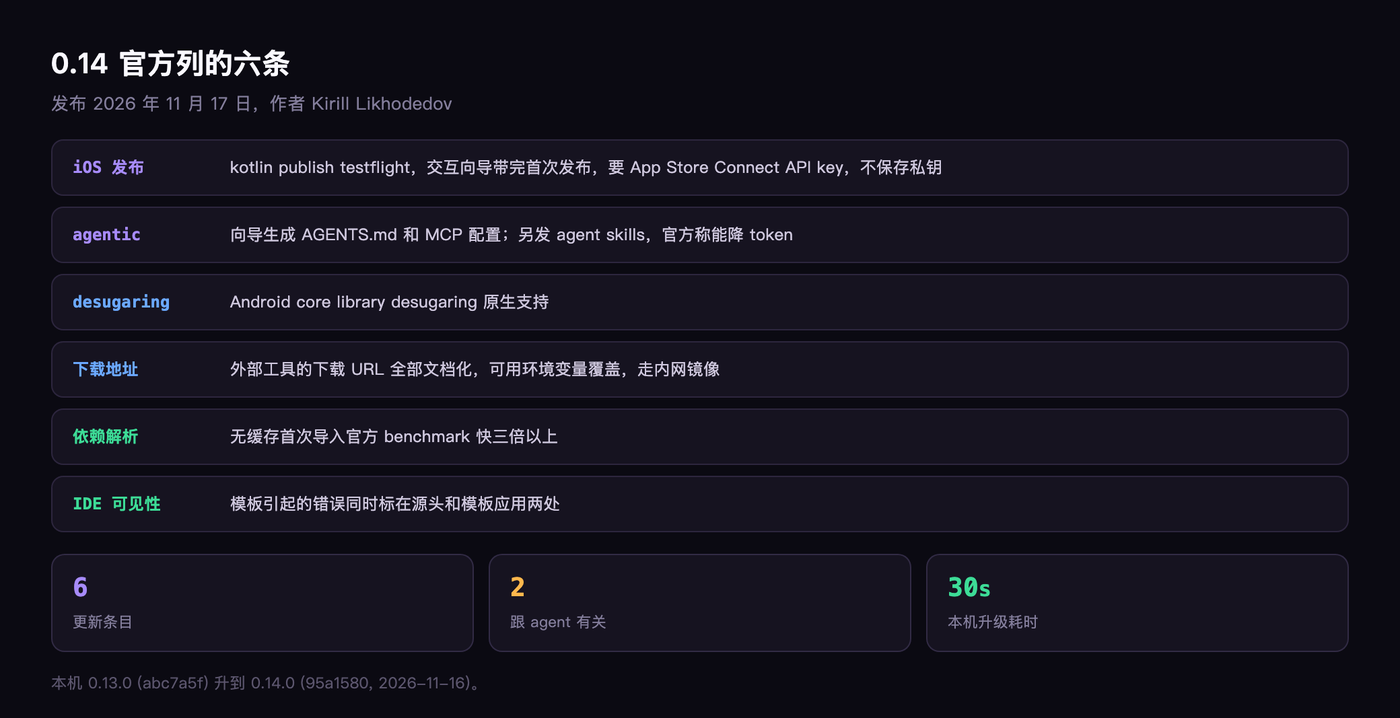
The official blog lists six items.
The heaviest is iOS app publishing: kotlin publish testflight, an interactive wizard that walks you through the first release, after which the same command ships updates. It needs an App Store Connect API key. The official post stresses that the private key is never stored in code, and that no Apple ID password is involved.
Second is the agent side. The CLI wizard now generates MCP server configuration and AGENTS.md, and Kotlin Toolchain agent skills shipped at the same time, installed with npx skills add kotlin/kotlin-agent-skills.
The official claim: their own AI evals show that using these skills cuts token consumption.
The other four are smaller. Errors caused by a template in the IDE now get flagged both at the source and where the template is applied; Android gets core library desugaring; every external tool download URL is documented and can be overridden with environment variables; and dependency resolution is faster — the official benchmark claims uncached first import is more than three times faster.
The Upgrade Itself Takes Thirty Seconds
This machine had 0.13.0, sitting at ~/.local/bin/kotlin.
I reran the official install script, curl -fsSL https://kotl.in/install.sh | sh. It downloaded the new CLI runtime v25.38.109, and afterward the version reads 0.14.0, commit 95a1580, build date November 16, 2026.
No leftovers, no old directory to clean up by hand. That’s cleaner than most tools manage.
When You Create a Project, Part of the Output Is for the Agent
I used kotlin new to create a three-platform project — Android, iOS, desktop — and passed --agent=other.
At the end, the CLI printed a paragraph. It said: this project configures MCP servers, such as Compose Hot Reload, but they aren’t available in this session, because MCP servers only load when a session starts — ask the user to restart you from the project directory, and then you’ll be able to use them.
That paragraph isn’t addressed to me. It’s asking the agent to relay a sentence to me.
Then look at the end of kotlin new --help, where there’s another paragraph: when creating a project, always pass --agent=<your agent name>; it helps set up AGENTS.md, skills, MCP servers and other AI features. Only pass --no-ai when the user explicitly asks for it.
The help text says “always pass,” and the subject is the agent. This thing was designed on the assumption that an agent will read the help.
One Rule in AGENTS.md: Don’t Write Sleep Loops
The generated AGENTS.md is only 23 lines, but it’s dense.
It starts by telling you to use the project’s own ./kotlin wrapper, not the global command. Then it covers the right way to do UI work: start the app before you touch the code, run it in the background with --compose-hot-reload, then call the MCP status repeatedly until it returns connected: true, because the first build can take minutes.
The line I most want to steal comes next: status is the only readiness signal — don’t tail or grep the run logs, don’t write sleep loops.
That rule clearly grew out of real failures. I’ve watched plenty of agents get stuck in exactly that spot: write a sleep 30, go read the log, and misread a half-finished build as success.
There’s more alongside it: if startup fails, don’t guess — read lastError in status and use the MCP get_logs tool; once connected, apply UI changes with reload, or await_reload if buildContinuous is on.
But Your Agent Has to Be on the List
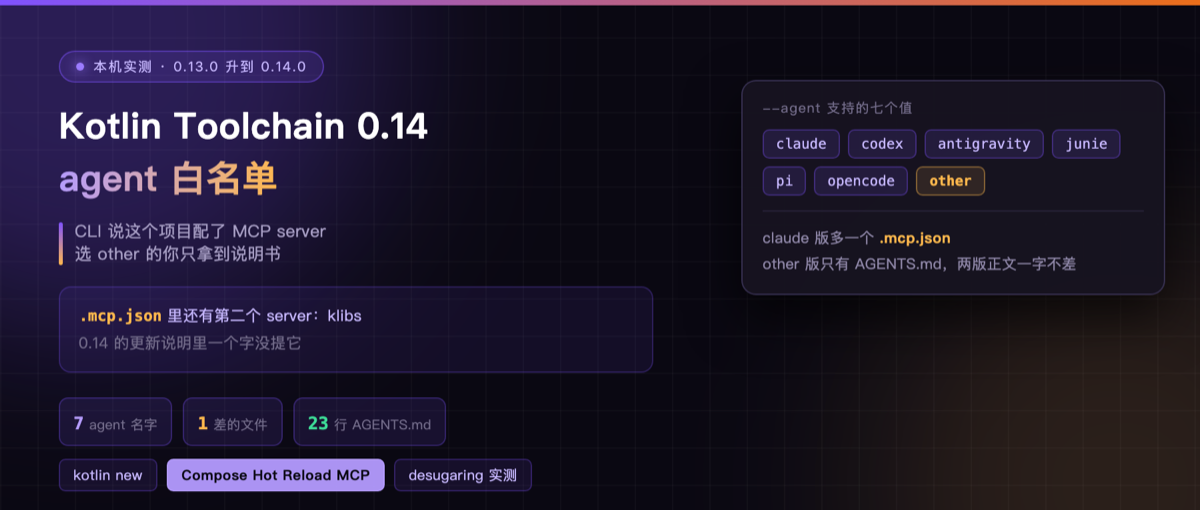
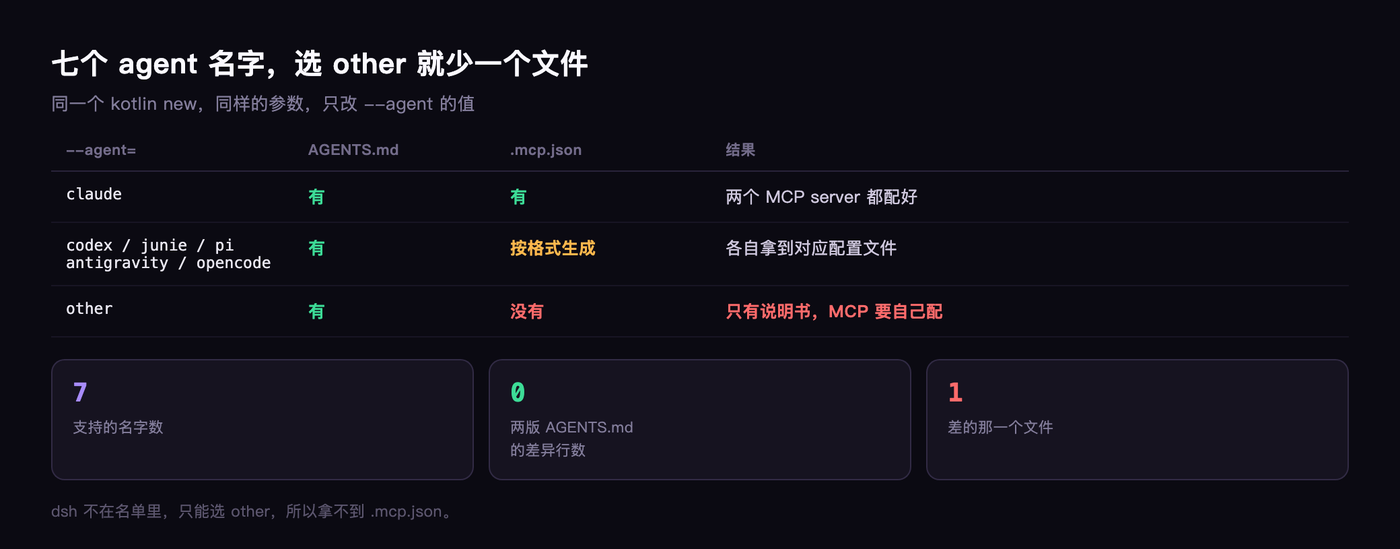
--agent accepts seven values: claude, codex, antigravity, junie, pi, opencode, other.
I created one project with --agent=other and another with --agent=claude — same command, same project arguments — then compared the generated files.
The claude one has an extra .mcp.json. The other one doesn’t.
Line by line, the two AGENTS.md files are identical. The difference is that one file.
And the CLI output says “this project configures MCP servers” in both cases. For other, that promise is only half kept: you get a set of instructions and are left to wire it up yourself.
I Installed the Skills, and My Agent Got Skipped
The official skills install command is npx skills add kotlin/kotlin-agent-skills. I ran it in the project directory.
It installed 10 skills under .agents/skills/, and generated a copy under .claude/skills as well.
The interesting part is the install log. Each skill is followed by three grouping lines: the universal bucket lists Antigravity, Gemini CLI, OpenCode, Pi, Warp plus 16 more; the symlinked bucket has only Claude Code.
The skipped bucket reads OpenClaw, Command Code, Hermes Agent, Junie — all with the reason project directory not found.
Hermes Agent is what I’m using right now. It was recognized, and then skipped.
Of the ten skills, only two declare test information at the top. kotlin-tooling-kotlin-toolchain says anthropic/claude-sonnet-5, anthropic/claude-opus-5, with agent_version claude-code and last_eval August 14, 2026.
The other one, kotlin-tooling-native-build-performance, says openai/gpt-5.5, openai/gpt-5.4-mini, last_eval July 6.
The remaining eight say nothing.
The official line — our AI evals show skills cut token consumption — isn’t wrong. But file by file, only one in five carries an eval record, and what was tested was the Claude and GPT lines.
Two Servers in That .mcp.json
The claude version’s config file looks like this.
One is called compose-hot-reload, command ./kotlin compose-hot-reload-mcp-server, running locally.
The other is called klibs, type http, address https://api.klibs.io/mcp.
The official blog doesn’t mention the second one at all. I went through the 0.14 release notes and docs; the agent section covers AGENTS.md and skills and says nothing about this klibs service.
Most likely it’s there so agents can look up Kotlin library information — it sits behind klibs.io, the library index site.
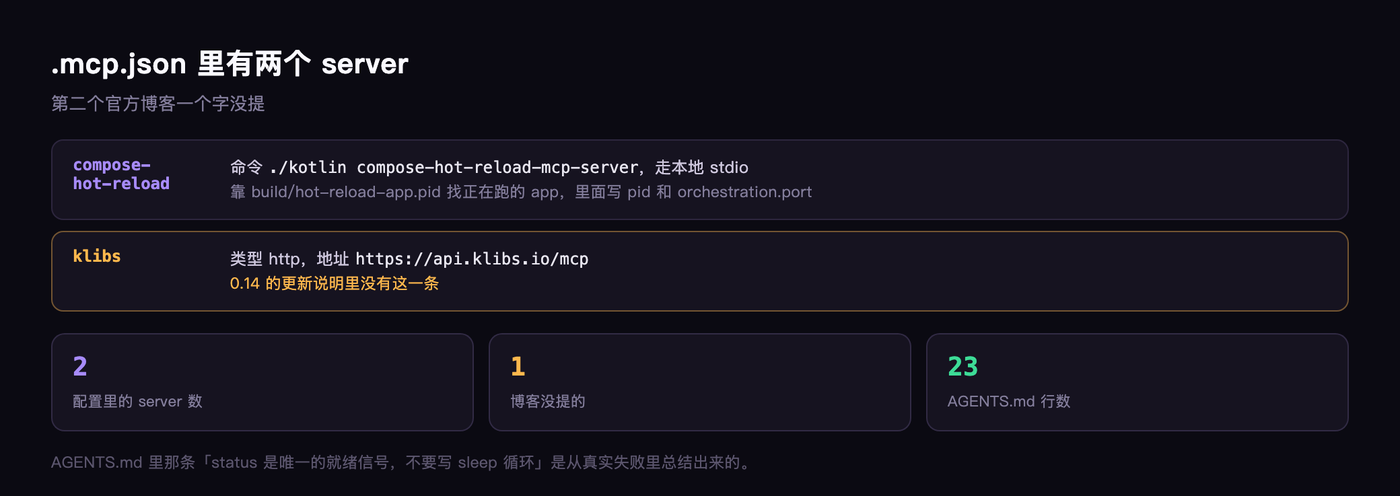 But this finding only comes out of the generated config file. It isn’t in the docs.
Four Builds, Real Numbers
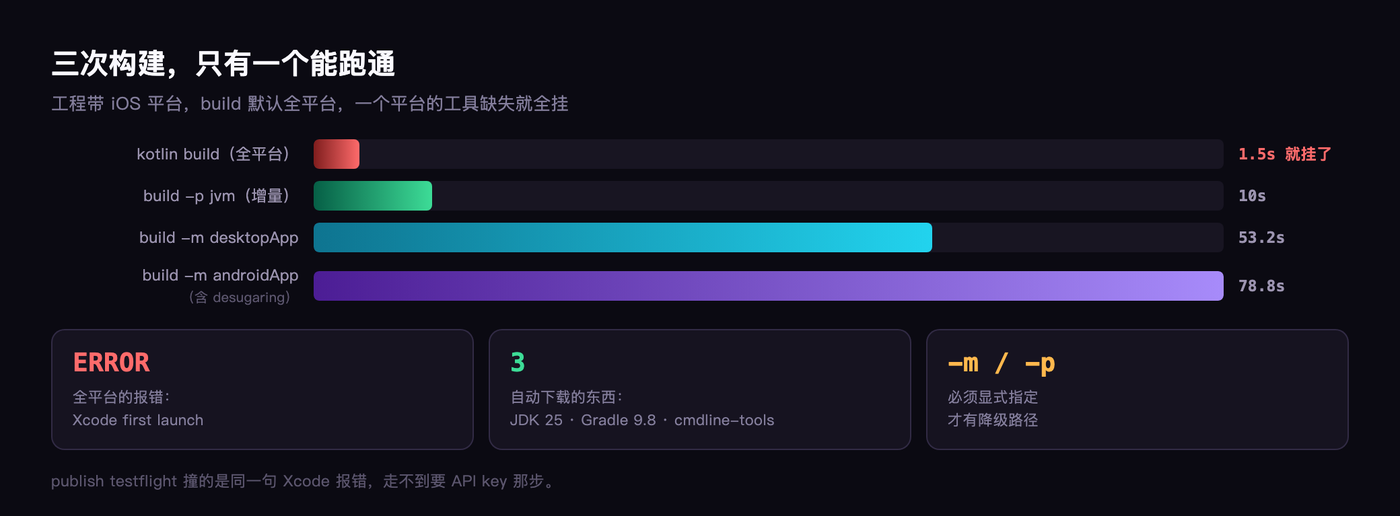
The project carries three platforms, and build defaults to all of them. I ran each platform separately and got these numbers.
./kotlin build -p jvm — 10.0 seconds, incremental, the fastest.
./kotlin build -m desktopApp — 53.2 seconds; it downloaded JDK 25.0.5 along the way.
./kotlin build -m androidApp — 78.8 seconds; midway it downloaded Gradle 9.8.0 and the Android commandlinetools.
./kotlin build with no arguments — 2 minutes 45 seconds, all platforms, one pass.
I ran the first three separately on purpose, because I wanted to know exactly what the toolchain pulls into its own arms. The answer is everything: JDK, Gradle, Android SDK, the Kotlin/Native prebuilt, xcbeautify — none of it needs installing beforehand.
Which is also the evidence for the fifth 0.14 change: every external tool download URL is documented, and can be pointed at an internal mirror via environment variables.
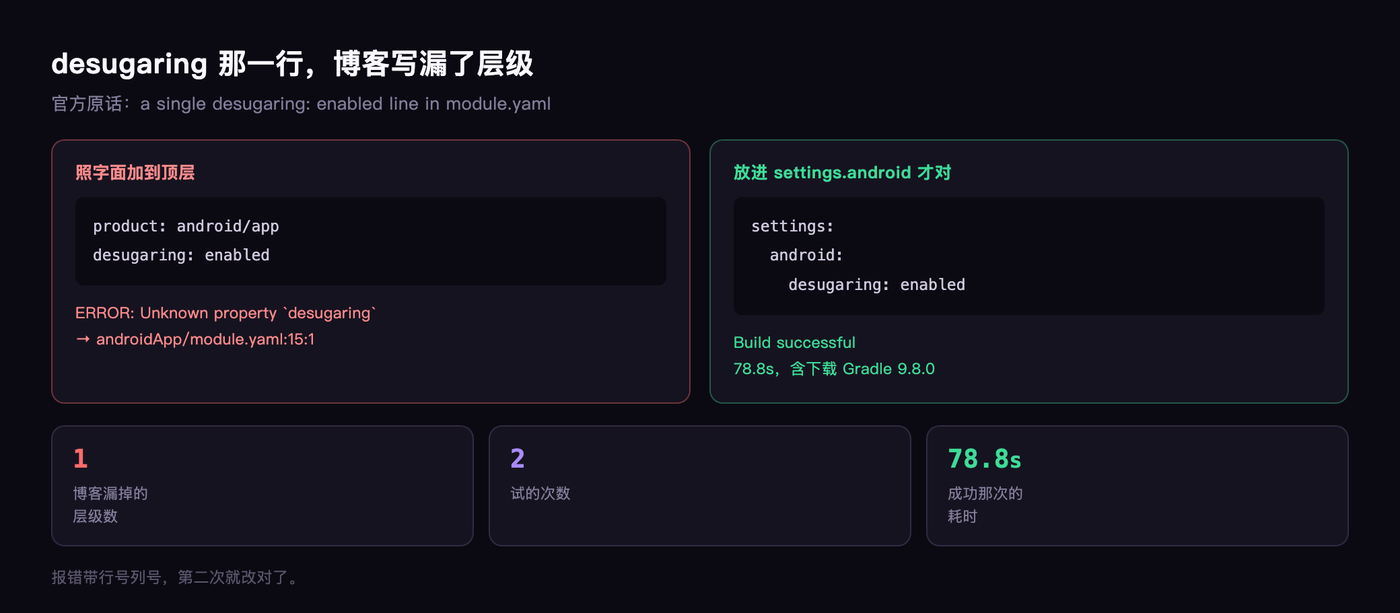
On desugaring, the blog’s wording is: add one line, desugaring: enabled, in module.yaml. I added it literally at the top level and got Unknown property 'desugaring', with line and column numbers and all.
It only passed once I moved it under settings, inside android.
The blog post is too terse here. The sentence as written will make people put it at the top level. There’s a docs link right after it, but the body text shouldn’t be written that way.
Full Platform Build: 2 Minutes 45 Seconds, Both Ends Deliver
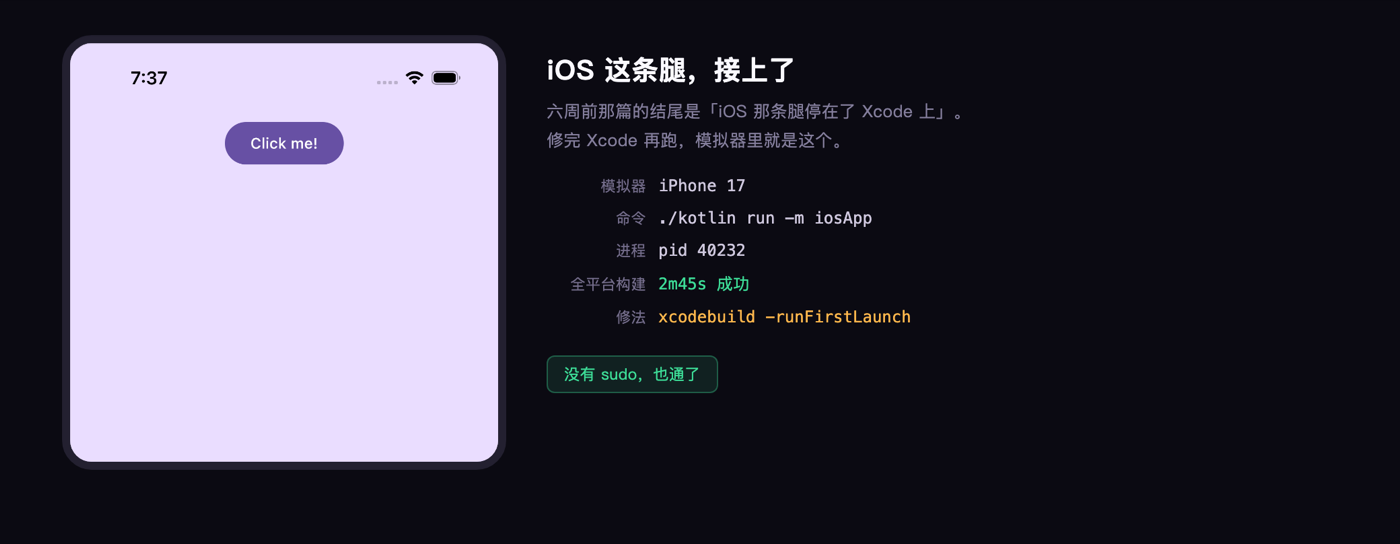
./kotlin build with no arguments: 2 minutes 45 seconds, Build successful.
Going through the log line by line: shared’s android tests, iosArm64, iosSimulatorArm64, plus the test compilation for the last two — all successful. iosApp’s iosArm64 and iosSimulatorArm64 also succeeded.
Along the way it downloaded kotlin-native-prebuilt 2.4.20 and xcbeautify 3.2.1.
One warning is worth recording: the DEVELOPMENT_TEAM build setting wasn’t detected in the Xcode project, so the toolchain added CODE_SIGNING_ALLOWED=NO itself, disabling signing and leaving you to sign manually later. That’s decent handling — it didn’t quietly burn down the project.
Further down: ./kotlin run -m iosApp, and it installed the app into an iPhone 17 simulator.
The default purple Compose screen, a Click me! button in the middle. Process pid 40232, sitting in launchctl as UIKitApplication:dev.lazy.ktc014.
Six weeks ago I wrote that the iOS leg stopped at Xcode. This time it actually connects.
TestFlight: Now Just One Key Short
kotlin publish testflight -m iosApp went straight into a “Connect your Apple Developer account” wizard.
One step, one sentence. Go to Users and Access in App Store Connect and find the team API key; automatic provisioning needs an Admin-level key, which requires Apple Developer Program membership plus API access permission.
Download the .p8 private key and store it somewhere safe, not in the repo. Then it wants three things: the key path, the Key ID, the Issuer ID.
It adds one more line: Kotlin Toolchain never copies or stores this file. What you enter goes into app-store-connect-auth.properties in the module directory, and a line gets added to .gitignore automatically.
I don’t have a .p8, so I stopped at its closing line: A readable private key path, Key ID, and Issuer ID are all required. Then it politely told me to come back when I’m ready.
So the only gate left on this path is an Apple developer account. On the toolchain’s side, everything that needed doing is done.
The boundaries you can read out of the help are worth stating too.
The three environment variables KOTLIN_TOOLCHAIN_ASC_KEY_PATH, KOTLIN_TOOLCHAIN_ASC_KEY_ID, KOTLIN_TOOLCHAIN_ASC_KEY_ISSUER_ID are the CI path; the file takes precedence over the environment variables.
One iOS app per publish; a multi-app project needs -m. Signing only supports automatic mode with a straightforward setup — for anything complex it sends you to fastlane.
There’s one more thing the blog doesn’t say, but you can’t avoid once you use it.
The MCP server finds the app through build/hot-reload-app.pid, which holds the app’s pid and an orchestration.port. If the app isn’t running, that file is empty or stale and status will never connect. That’s why AGENTS.md wants the app started first.
My Verdict
0.14 moves on both fronts.
The agent side genuinely took a step forward: the rules in AGENTS.md are pragmatic, the MCP server answers, the pid file mechanism is solid. The problem is the allowlist — dsh isn’t among the seven agents, so I have to pick other, and then I don’t get .mcp.json. The CLI says “this project configures MCP servers,” and then hands me a manual so I can wire it up myself.
The iOS side got most of the way there. The full three-platform build passes in one go, the simulator installs and runs, and the publishing path reaches App Store Connect — it only lacks a developer account’s .p8. In the 0.13 era that line broke halfway; now it’s a straight line from creating a project to shipping an artifact, with no hand-editing the Xcode project, no Gradle scripts, and no need to know where kotlin-native landed.
So this upgrade is worth doing. Provided your agent is on the list, the extra is real; if it isn’t, you can still use it, you just fill in that half a file yourself.
On iOS, it tells you outright what’s missing. Missing an account means an account is all that’s missing.
Is your agent on that list?